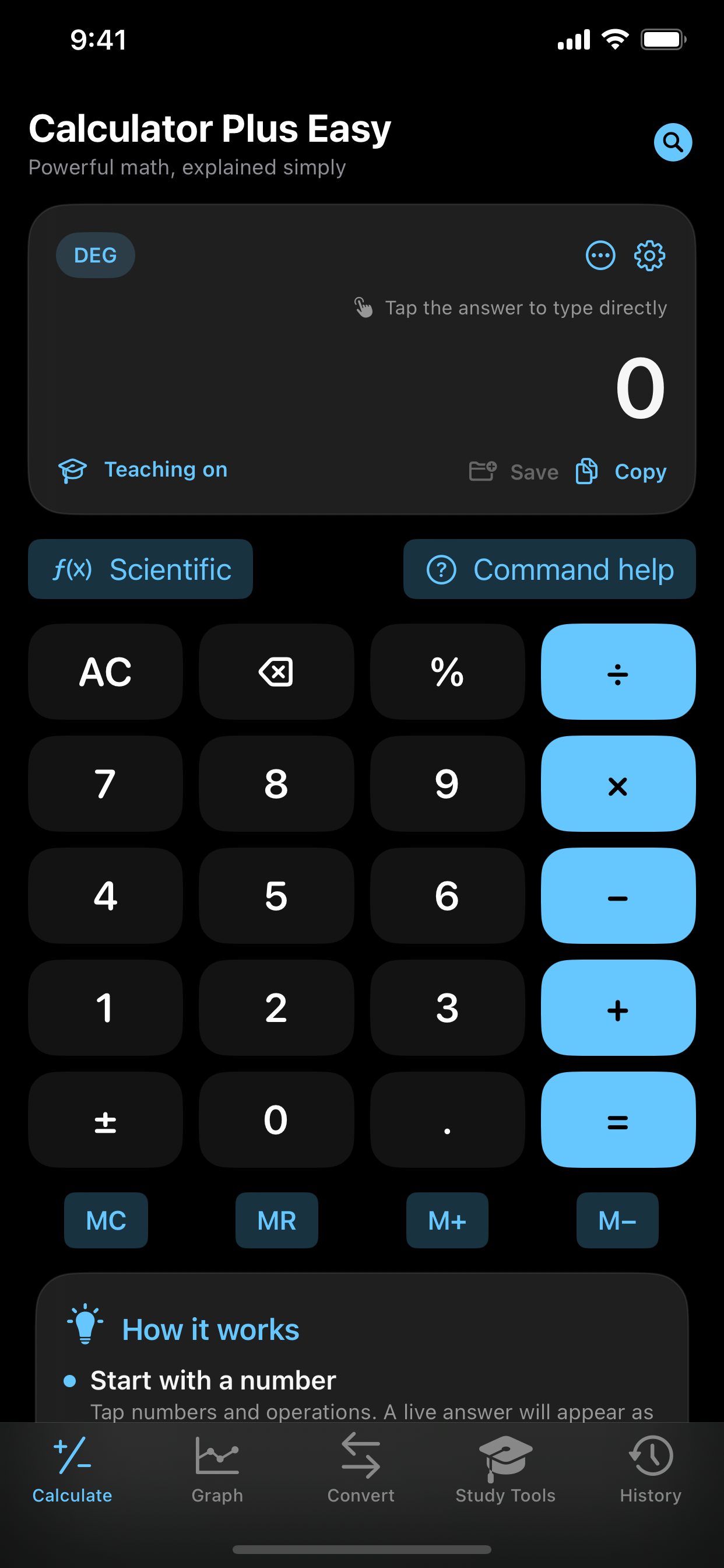
Because powerful math software can be capable and still explain what it is doing.
APP SCREENSHOTS
See it in action.
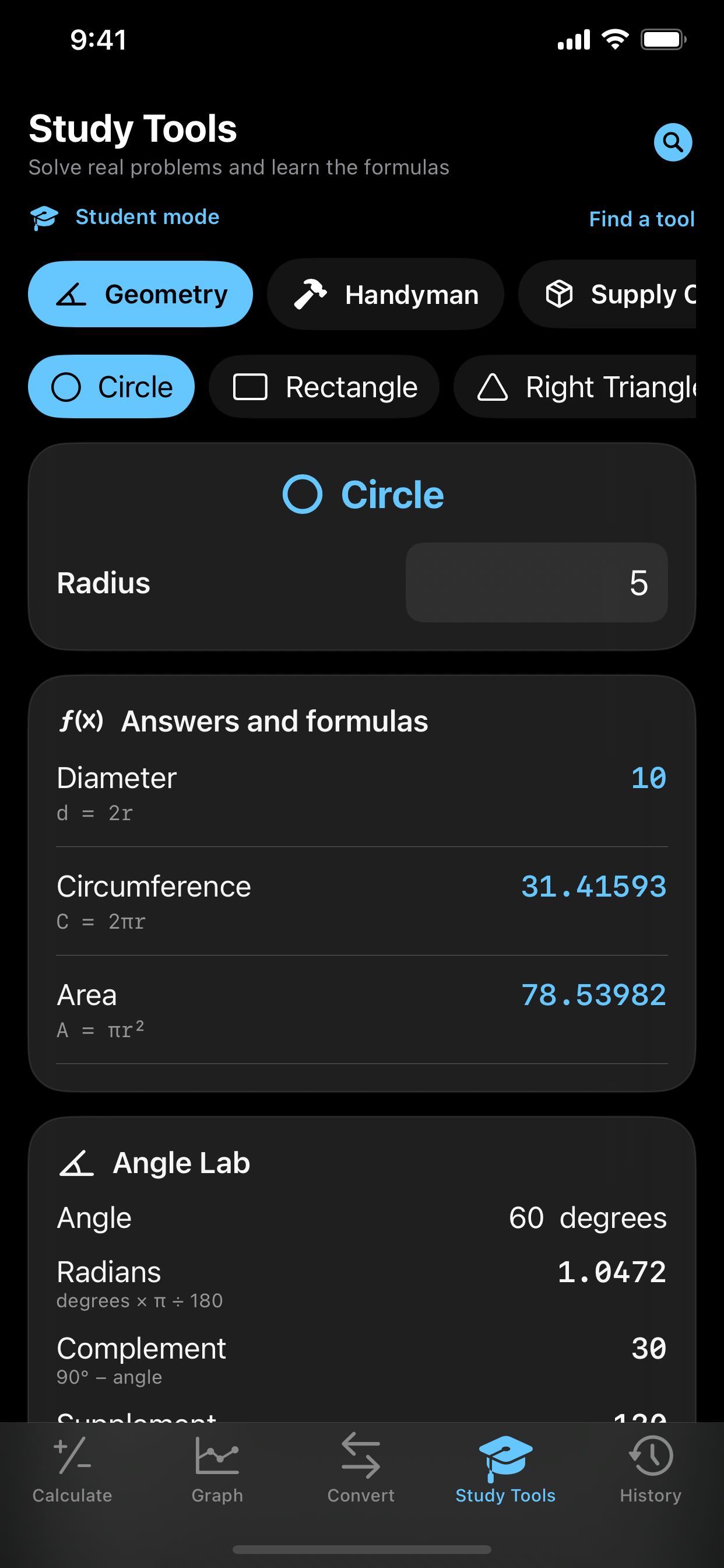
Real screens from Calculator Plus Easy, shown large enough to see the details.
Screen 01Screen 02Screen 03
FEATURES AT A GLANCE
What Calculator Plus does best.
Focused capabilities, designed to make the whole task faster and easier to understand.
01
Scientific calculator with step-by-step teaching mode
02
Multi-function graphing, tracing, zoom, and value tables
03
Offline Problem Coach for plain-language word problems
04
Hundreds of STEM, finance, engineering, and planning tools
WHAT YOU CAN DO
Built for the whole task.
Start simple, then go further when the job calls for it. These are the everyday workflows Calculator Plus is designed to make easier.
01
Calculate without changing apps
Move from everyday arithmetic into scientific functions, constants, conversions, and more advanced expressions in the same workspace.
02
See how an answer was reached
Teaching views break supported problems into understandable stages so students can learn the method instead of receiving only a final number.
03
Graph and inspect functions
Plot multiple expressions, zoom and pan, trace values, and use tables to connect an equation with its visual behavior.
04
Open a tool for the real problem
Guided calculation packs organize formulas for STEM, finance, engineering, planning, and other practical tasks with labeled inputs and explained results.
THE NERD SECTION
For people who want the details.
Calculator Plus Easy combines an expression engine, graphing tools, guided formulas, and teaching workflows while keeping the results readable for someone who is still learning.
01
Expression parsing
Typed expressions are tokenized and evaluated with operator precedence, parentheses, functions, constants, and explicit error handling rather than being treated as a sequence of button presses.
02
Graph sampling and inspection
Functions are evaluated across the visible domain to draw plots, while tracing and value tables expose the numeric samples behind the visual curve.
03
Guided calculation packs
Each workflow defines named inputs, units, formulas, validation rules, and a plain-language result so specialized calculations remain discoverable and auditable.
04
Offline-first coaching
Supported teaching and problem-solving tools are designed to work on the device, keeping the core calculator useful even when a network service is unavailable.
EQUATIONS, MADE VISIBLE
See the shape of an idea.
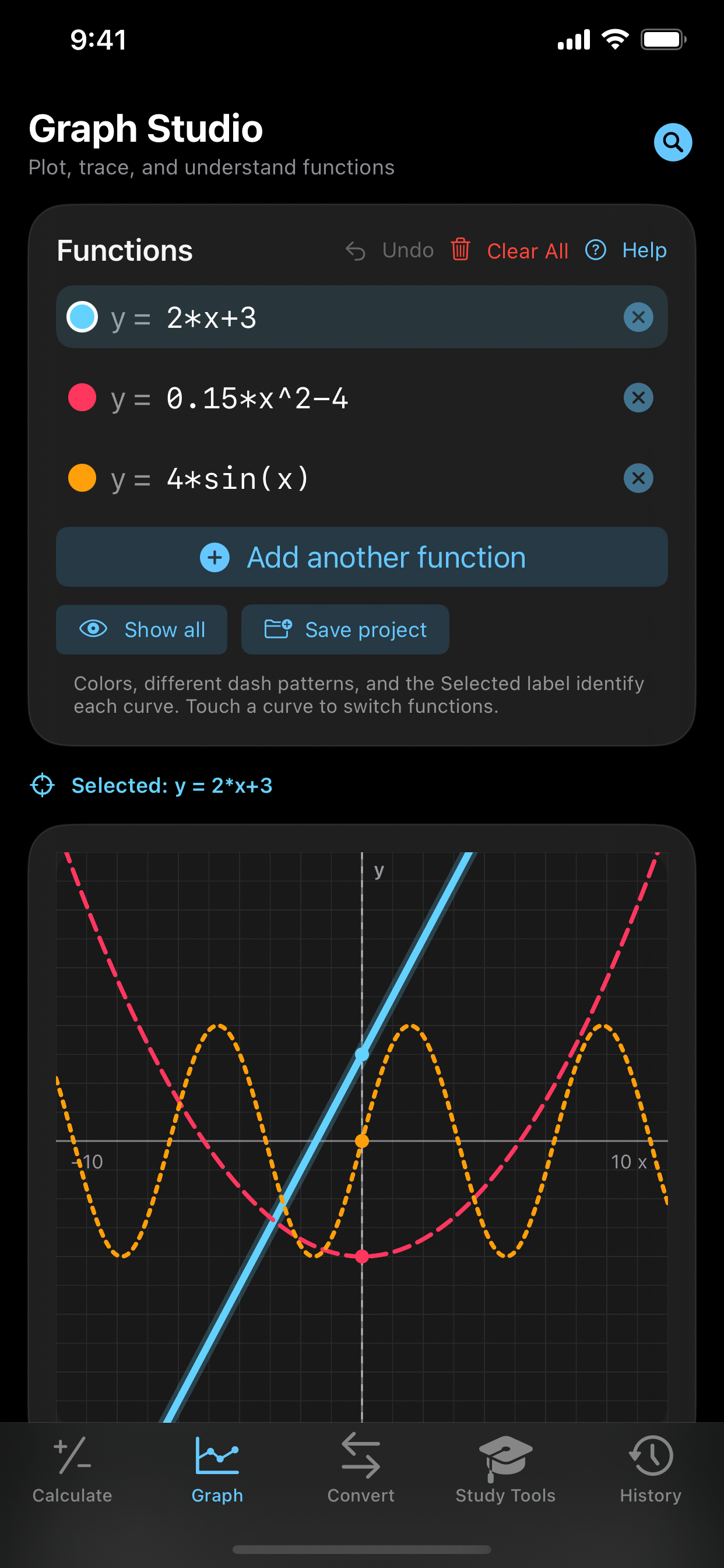
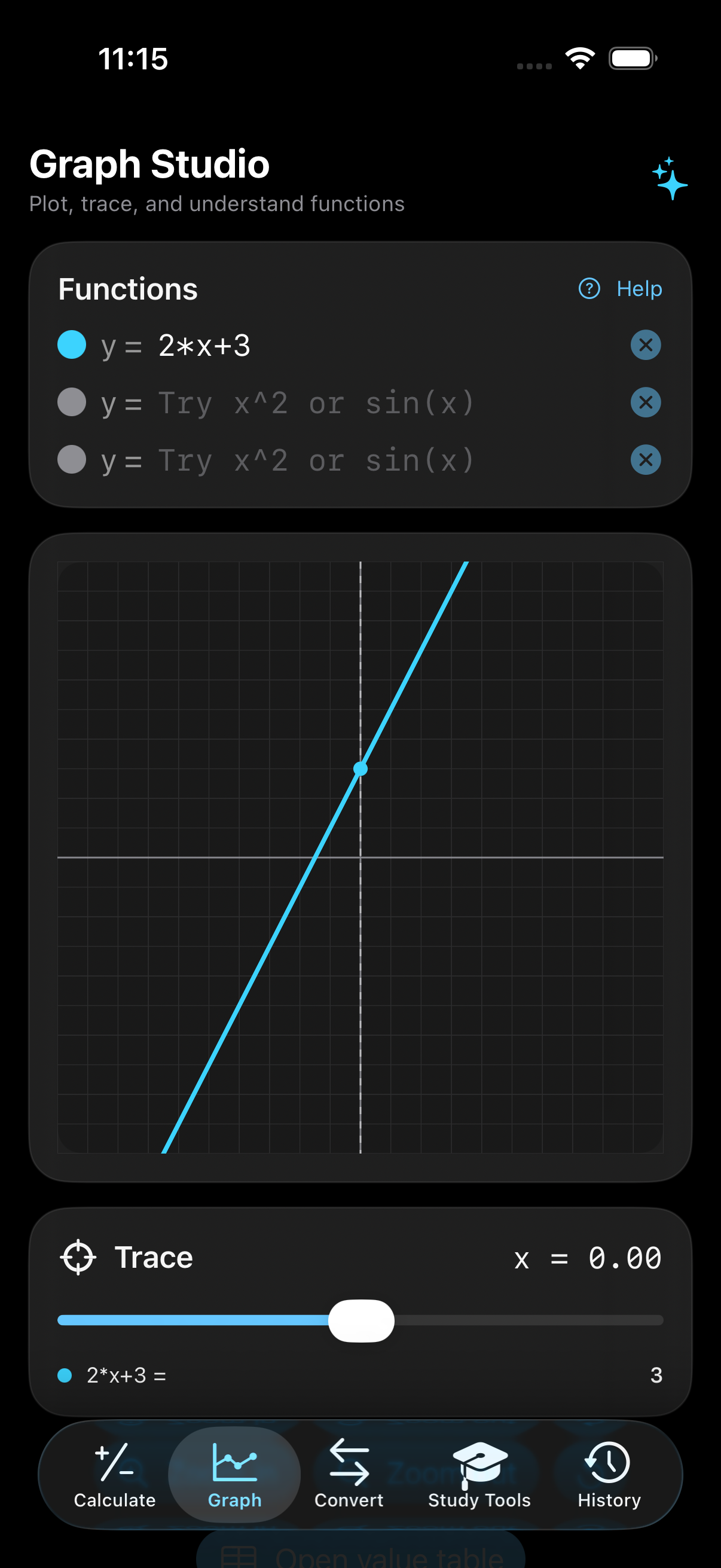
Actual Graph Studio screenshots. Try the expressions below in the app, then compare curves, trace values, zoom, or open a value table. Trigonometric graph inputs use radians.
Algebra · Grades 8–12
A line you can inspect
Slope 2. Intercept 3. The captured trace at x = 0 shows y = 3—an immediate connection between the formula and the graph.
y = 2*x+3
Select image to view full size ↗Algebra & trigonometry · High school / college
Three functions. One view.
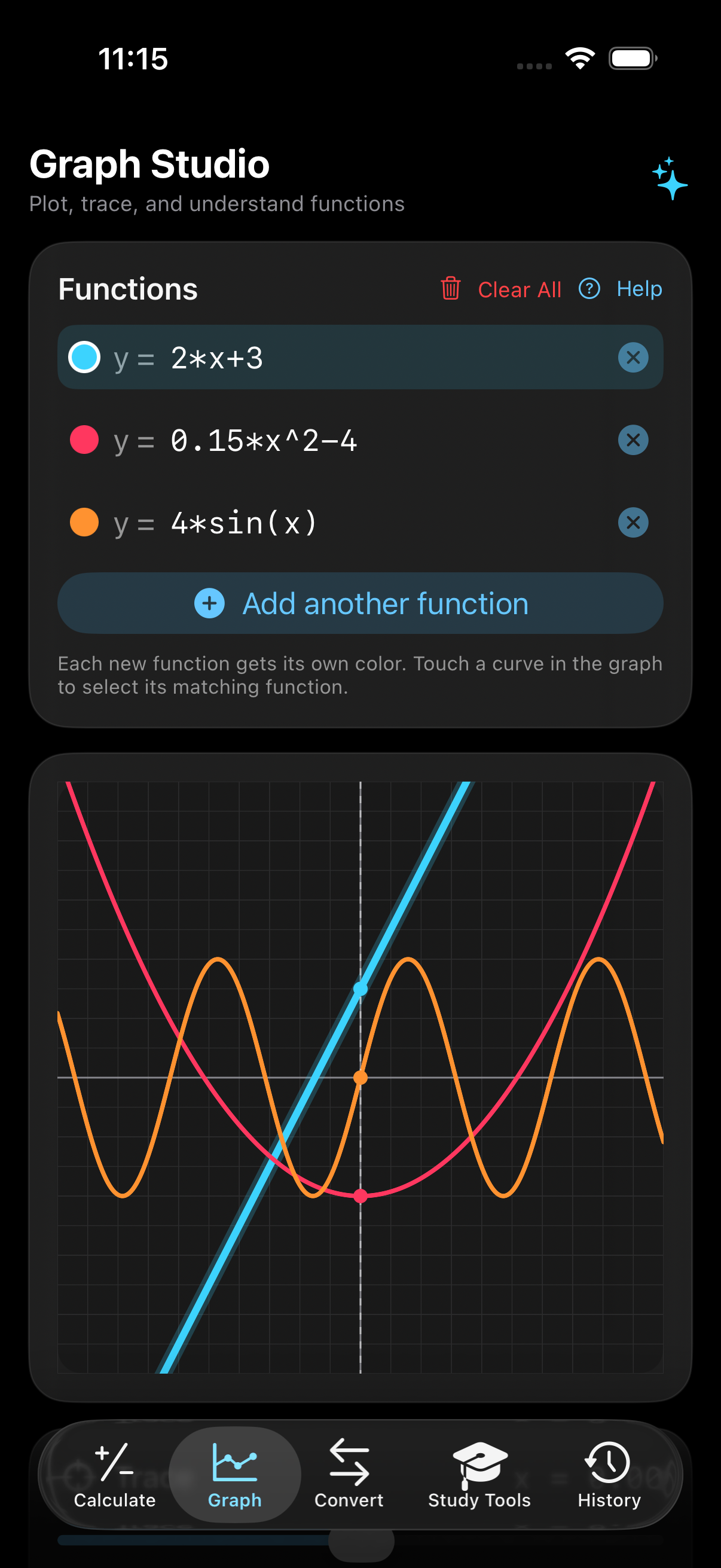
Compare linear growth, a parabola, and an amplified sine wave. Each function gets its own color so you can see how their behavior differs.
y = 2*x+3y = 0.15*x^2-4y = 4*sin(x)
Select image to view full size ↗Precalculus & function analysis · High school / college
Compare a wave and a curve
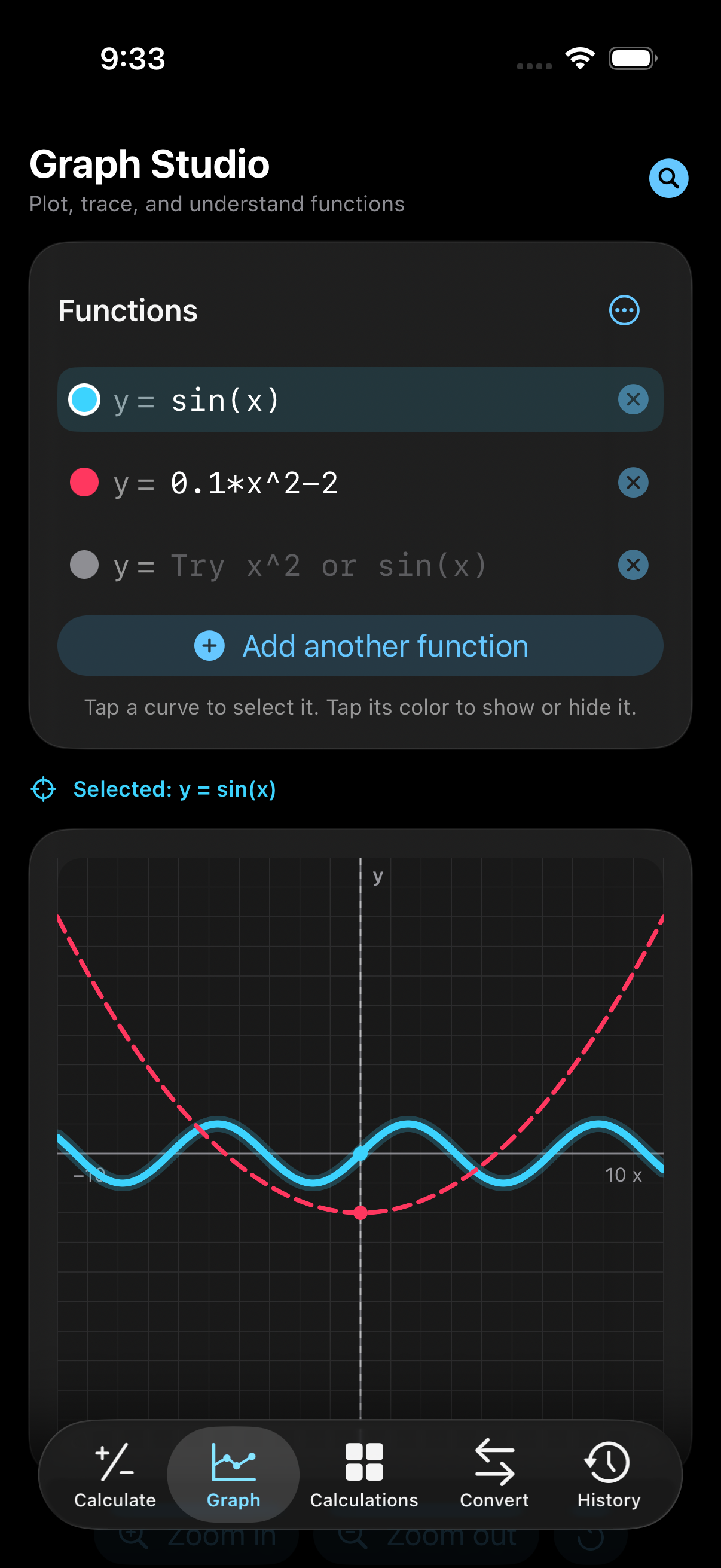
Inspect oscillation beside quadratic growth. Tap a curve in the app to select its function, or tap its color to show or hide it.
y = sin(x)y = 0.1*x^2-2
Select image to view full size ↗
Real in-app captures from development builds, not illustrated mockups. Interface details may vary by version.
THE CALCULATION LIBRARY
From first sums to specialized formulas.
Find the level or application that fits your work. Use the main calculator for expressions and supported commands; open Calculations in the app for guided, industry-specific inputs and formulas.
A path through the levels.
Grade bands are approximate: curricula differ, and individual formulas can be useful at more than one level. Examples use calculator-friendly syntax.
Grades 1–5
Build number confidence
Addition, subtraction, multiplication, division, parentheses, fractions, decimals, and percentages.
15-8+4
Check arithmetic and explore order of operations.
Grades 6–8
Connect numbers and shapes
Ratios, unit conversions, area, circumference, triangle geometry, and supported linear equations.
solve(3*(x-4)+2=5*x-14,x)
Move from arithmetic into pre-algebra and geometry.
Grades 9–12
See algebra take shape
Quadratic roots, scientific functions, trigonometry, statistics, and multiple functions on one graph.
roots(x^2-2*x-48)
Explore algebra, precalculus, and calculator-friendly practice.
College undergraduate
Work through calculus
Supported symbolic derivatives and definite integrals, numerical calculus, matrices, regression, and differential-equation methods.
derivative(x^3,x)
Connect symbolic expressions, numerical results, and graphical behavior.
Graduate / selected research-level topics
Go beyond everyday math
Supported mixed partials, limits, infinite-series families, inverse Laplace transforms, special functions, and selected exact symbolic problems.
inverseLaplace(5/(s^2+49),s,t)
Study specific advanced problem families—not a general proof engine or an unlimited computer algebra system.
Trade / professional applications
Calculate for the job in front of you
Guided inputs for planning, finance, engineering, laboratories, business metrics, construction, and practical measuring.
120/6
For example: price per share ÷ earnings per share gives a P/E ratio of 20.
Core subjects. Specialized workflows.
Expand a subject to see its calculation families and practical outputs.
GeometryGrades 6–12 / practical measuring
Circle: diameter, circumference, area
Rectangle: area, perimeter, diagonal
Right triangle: area, hypotenuse, both acute angles
General triangle: validity, perimeter, Heron area, all three angles, inradius, circumradius
Ellipse: area and Ramanujan perimeter approximation
Cylinder: volume, surface area, base circumference
Sphere: diameter, volume, surface area
Rectangular prism: volume, surface area, space diagonal
Cone: volume, slant height, surface area
Rectangular pyramid: volume and base area
Torus: volume and surface area
Cube: volume, surface area, space diagonal
Hemisphere: volume, curved area, total area
Angle lab: radians, complement, supplement
Supply Chain and OperationsCollege / professional applications
SAP-style master data: Material, Plant, MRP Area, Base UoM, MRP Controller, MRP Type, Lot Sizing Procedure, Procurement Type, Strategy Group and Availability Check
Time-phased demand management: monthly Planned Independent Requirements, scheduled receipts, adjustable planning horizon and even/increasing/decreasing/seasonal demand distribution
Monthly MRP run: gross requirements, net requirements, projected available balance, planned receipts, purchase requisitions or planned orders, release offsets and exception messages
Lot sizing and scheduling: EX lot-for-lot, FX fixed lots, HB maximum-stock replenishment, minimum/maximum lots, rounding values, safety stock, reorder point, scrap and replenishment lead time
MRP: net requirement, planned order receipt, planned release offset, projected ending inventory
Inventory policy: reorder point, EOQ, safety-stock coverage
Forecasting: mean demand, 3-period moving average, exponential smoothing
Forecast quality: MAD, MSE, MAPE and demand standard deviation
Statistical inventory: 95% safety stock using service factor and variability
Production: takt time, theoretical capacity, labor productivity
OEE: availability, performance, quality, total OEE
Quality: first-pass yield and defect rate
Service: on-time delivery, order fill rate, perfect-order rate and backorder rate
Working capital: inventory turnover, days inventory outstanding and annual carrying cost
FinanceCollege / professional applications
Time value of money: compound future value, annuity future value and combined future value
Lending: amortizing monthly loan payment
Equity valuation: P/E, earnings yield, P/B, dividend yield and PEG
Capital budgeting: NPV and IRR
Cost of capital: WACC and CAPM expected return
Profitability: gross profit, gross margin, operating margin, net margin, ROA and ROE
Leverage and liquidity: debt/equity, current ratio, quick ratio and working capital
Managerial finance: contribution margin, contribution-margin ratio, break-even units and asset turnover
Fixed income: bond price, annual coupon, current yield, approximate YTM, Macaulay duration, modified duration and DV01
Investment performance: holding-period return, price CAGR and annualized total return
DC networks: Ohm's law, current, conductance, power, energy, series resistance and parallel resistance
AC/RLC: inductive and capacitive reactance, impedance, RMS current, phase, power factor, real/reactive/apparent power, resonance, bandwidth and Q factor
Transients: RC/RL time constants, cutoff frequency, capacitor charge/discharge, capacitor energy, inductor current and inductor energy
Circuit design: voltage dividers, inverting/non-inverting op-amp gain, LED current limiting, ADC resolution, DAC output and voltage-gain decibels
PhysicsHigh school / college
Kinematics: final velocity, displacement, velocity-position relation and projectile flight time/range/height
Mechanics: Newtonian force, kinetic and potential energy, momentum, work, power, centripetal force, angular velocity and torque
Waves and optics: wave speed, period, photon energy, Snell's law, critical angle, thin-lens image distance and magnification
Thermodynamics and electromagnetism: ideal gas, sensible heat, Carnot efficiency, Coulomb force, electric field/potential, capacitor charge/energy and magnetic force
ChemistryHigh school / college
Moles, particles, molarity, molality approximation, dilution and mass percent
Ideal-gas pressure/volume, density, pH, pOH and hydroxide concentration
Zero-, first- and second-order kinetics, half-life and Beer-Lambert concentration
StatisticsHigh school / college
Count, sum, mean, median, range, sample variance/deviation, standard error, confidence interval and coefficient of variation
Linear-regression slope/intercept, correlation, R-squared and prediction
Permutations, combinations and binomial probability, mean, variance and standard deviation
EngineeringCollege / professional applications
Materials: stress, strain, Young's modulus, factor of safety and strain-energy density
Fluids: Reynolds number, flow area, volumetric/mass flow, dynamic pressure, hydrostatic pressure and velocity head
Heat transfer: conduction, thermal resistance, convection and radiation
Calculus, Algebra and BiologyCollege / professional applications
Numerical function evaluation, first/second derivatives and Simpson-rule definite integrals
Quadratic discriminant, roots and vertex
Exponential/logistic population growth and doubling time
Hardy-Weinberg frequencies, Michaelis-Menten velocity and first-order drug elimination
Civil and Structural EngineeringCollege / professional applications
Rectangular-section properties, simply supported beam moment/shear/stress, point-load and distributed-load deflection
Column radius of gyration, slenderness, Euler buckling load and buckling safety factor
Advanced MathematicsCollege / professional applications
3D vector magnitudes, dot/cross products, angle, scalar projection and endpoint distance
2×2 determinant, trace, inverse, eigenvalues and Cramer's-rule linear-system solution
Newton-Raphson nonlinear root solving with residual, iteration count and numerical derivative
Calculus Pro and Mathematical AnalysisCollege / graduate study
Real analysis: five-point first and second derivatives, third and fourth derivatives, adaptive Simpson quadrature, interval mean, arc length, tangent line and local curvature
Vector calculus: two-component vector fields, divergence, scalar curl, Jacobian determinant, closed-path circulation and outward flux around a circle
Differential equations: first-order initial-value problems using Euler, Heun RK2 and classical Runge-Kutta RK4, with method-difference and final-slope diagnostics
Fourier analysis: DC, cosine and sine coefficients, harmonic amplitude/phase, truncated reconstruction and pointwise error on a configurable period
Decay constant, remaining and decayed nuclei, activity, and instantaneous decay power.
Binding energy and binding energy per nucleon; ideal fission thermal and electrical energy.
Ideal exponential attenuation, half- and tenth-value layers, inverse-square intensity, reaction rate, and simple reactivity calculations. These are simplified teaching models, not safety analyses.
AstrophysicsCollege / astronomy and astrophysics
Blackbody luminosity, observed flux, distance modulus, photometric distance, and Wien peak wavelength.
Circular orbital speed, orbital period, escape velocity, surface gravity, and Schwarzschild radius.
Redshift velocity, low-redshift Hubble-distance estimates, and approximate light-travel time. Precision cosmology needs a fuller model.
Greatest common divisor, least common multiple, modular exponentiation, and Euler totient.
Discrete-mathematics and mathematical-structure tools alongside supported exact symbolic commands.
Selected high-order derivatives, residues, exact series and integral families, and supported differential equations. Domain and syntax restrictions apply.
Pharmaceutical & Industrial QualityCollege / laboratory and manufacturing quality
Cp and Cpk process capability; availability, performance, quality, and overall equipment effectiveness.
Relative standard deviation, coefficient of variation, spike recovery, and bias.
Filter flux, throughput per area, log reduction, decimal-reduction time, and percent reduction.
Handyman & Gallery Wall PlanningEveryday / woodworking and trade
Woodworking cuts, kerf allowances, sheet goods, material estimates, and tape-measure fractions.
Picture spacing and mounting layouts with wall and object dimensions.
Visual gallery arrangements: rectangular, square, and circular objects, alignment guides, spacing, and height adjustments.
68 industry-specific packs.
From labor efficiency and inventory to optics and quantum-computing resource estimates. These are named calculations in the app—not a claim to replace specialized professional software.
Engineering
Electrical PowerCollege / professional · 5 named outputs
Real power
Apparent power
Reactive power
Voltage drop
Transformer secondary voltage
Controls & RoboticsCollege / professional · 5 named outputs
Proportional contribution
Integral contribution
Derivative contribution
PID command
Proportional-only closed-loop gain
Telecommunications & RFCollege / professional · 6 named outputs
Wavelength
Free-space path loss
Received power
Thermal noise floor
Ideal SNR
Shannon capacity
Petroleum EngineeringCollege / professional · 6 named outputs
Bulk rock volume
Pore volume
Hydrocarbon pore volume
Oil initially in place
Recoverable oil
Rate retained after one year
Mining & MineralsCollege / professional · 6 named outputs
Contained mineral
Recovered mineral
Concentrate mass
Tailings mass
Stripping ratio
Processing cost
Automotive EngineeringCollege / professional · 6 named outputs
Shaft power
Mechanical horsepower
Vehicle kinetic energy
Aerodynamic drag
Power to overcome drag
Vehicle momentum
Marine & NavalCollege / professional · 6 named outputs
Displacement
Buoyant force
Mass supported by volume
Displacement balance
Hull-speed estimate
Block coefficient
Renewable EnergyCollege / professional · 5 named outputs
Peak array output
Daily solar energy
Daily load energy
Daily energy balance
Battery autonomy
GIS & SurveyingCollege / professional · 6 named outputs
Surface distance
Initial bearing
Ground distance
Map distance
Grade
Slope distance
Fire Protection EngineeringCollege / professional · 5 named outputs
Single-head flow
Sprinkler flow estimate
Density-area demand
System demand with hose
Minimum pressure for density flow
Water & Wastewater TreatmentCollege / professional · 5 named outputs
Chemical feed
Detention time
Surface overflow rate
BOD removal
BOD removed
Semiconductor & MicroelectronicsCollege / professional · 5 named outputs
Diode current
Junction voltage ratio
MOS overdrive
Normalized saturation current
Normalized transconductance
Battery & Energy StorageCollege / professional · 6 named outputs
Pack nominal voltage
Pack capacity
Nominal stored energy
C-rate current
Ideal runtime
Cell count
Materials, Metallurgy & WeldingCollege / professional · 5 named outputs
Nominal stress
Yield factor of safety
Arc power
Weld heat input
Estimated 80% net heat
Transportation & Traffic EngineeringCollege / professional · 6 named outputs
Traffic flow
Traffic density
Reaction distance
Braking distance
Total stopping distance
Capacity utilization
Rail & Transit EngineeringCollege / professional · 5 named outputs
Power-limited tractive effort
Grade resistance
Net force after grade
Service braking distance
Mass per car
Acoustics & Audio EngineeringCollege / professional · 5 named outputs
Combined sound level
RMS sound pressure
Relative intensity
Sabine reverberation time
Time-based exposure dose
Laser & Photonics EngineeringCollege / professional · 6 named outputs
Photon energy
Photons per second
Pulse energy
Peak pulse power
Beam fluence
Diffraction divergence
Robotics KinematicsCollege / professional · 6 named outputs
End-effector X
End-effector Y
Radial reach
X velocity
Y velocity
Jacobian determinant
Drone & Autonomous Vehicle OperationsCollege / professional · 6 named outputs
Ideal endurance
Ideal range
Mission flight time
Mission energy required
Energy reserve after mission
Payload fraction
Science
Geology & GeophysicsCollege / professional · 6 named outputs
Bulk formation volume
Pore volume
Intrinsic permeability
Darcy volumetric flow
Darcy velocity
Pore velocity
Optics & PhotonicsCollege / professional · 6 named outputs
Image distance
Magnification
Rayleigh angular resolution
First diffraction angle
Light speed in medium
Photon energy
MeteorologyCollege / professional · 6 named outputs
Dew point
Humidex
Wind-chill estimate
Sea-level pressure
Standard lapse adjustment
Cloud-base estimate
Life Sciences
Biomedical EngineeringCollege / professional · 5 named outputs
Poiseuille resistance
Predicted laminar flow
Measured mean velocity
Wall shear stress
Reynolds number
Clinical & NursingCollege / professional · 6 named outputs
Weight-based maximum
Maximum daily dose
Maximum per dose
Ordered daily total
Maximum used
Volume per ordered dose
Epidemiology & Public HealthCollege / professional · 6 named outputs
Exposed risk
Unexposed risk
Relative risk
Odds ratio
Attributable risk
Incidence rate
Veterinary MedicineCollege / professional · 6 named outputs
Drug amount
Liquid dose volume
Maintenance fluid volume
Fluid rate
Resting energy requirement
Tablets per dose
DentistryCollege / professional · 5 named outputs
Weight-based maximum
Maximum permitted amount
Maximum whole cartridges
Cartridge utilization
Restoration material volume
Medical Imaging & RadiologyCollege / professional · 5 named outputs
Dose-length product
Estimated effective dose
Ultrasound wavelength
MRI Larmor frequency
Field-related proton energy
Nutrition & DieteticsCollege / professional · 5 named outputs
Body mass index
Mifflin-St Jeor BMR
Estimated daily expenditure
Protein target
Protein calories
Sports Science & BiomechanicsCollege / professional · 6 named outputs
Mechanical work
Average power
Impulse
Impulse velocity change
Jump potential energy
Ideal takeoff velocity
Genetics & BiostatisticsCollege / professional · 6 named outputs
Expected AA genotype
Expected heterozygotes
Expected aa genotype
Expected recombinants
Broad-sense heritability
Allele copies after sampling
Toxicology & Industrial HygieneCollege / professional · 5 named outputs
Eight-hour TWA
Inhaled mass
Body-weight dose
Hazard quotient
Approximate ppm at 25°C
Laboratory Medicine & DiagnosticsCollege / professional · 6 named outputs
Sensitivity
Specificity
Positive predictive value
Negative predictive value
Diagnostic accuracy
Dilution-corrected analyte
Home & Trade
Architecture & ConstructionCollege / professional · 6 named outputs
Plan area
Perimeter
Base material volume
Material with waste
Estimated material cost
Perimeter framing count
Architecture & Building DesignCollege / professional · 6 named outputs
Floor-area ratio
Estimated occupant load
Required ramp run
Roof rise at 6:12
Nominal 7-inch risers
Area per occupant
Industry
Manufacturing & MachiningCollege / professional · 6 named outputs
Cutting speed
Linear feed rate
Ideal cutting time
Taylor tool life
Surface travel per second
Turns over cut
AgricultureCollege / professional · 6 named outputs
Seeds required
Expected viable plants
Fertilizer required
Irrigation water
Expected production
Yield per viable plant
Food EngineeringCollege / professional · 6 named outputs
Ingredient quantity
Initial dry solids
Final product mass
Water removed
Six-log process time
Relative thermal lethality
Reliability & MaintenanceCollege / professional · 5 named outputs
Inherent availability
Failure rate
Mission reliability
Expected fleet failures
Planned availability
Packaging EngineeringCollege / professional · 6 named outputs
Package volume
Domestic dimensional weight
Package surface area
Palletized package volume
Compression safety factor
Load utilization
Business
Actuarial & InsuranceCollege / professional · 6 named outputs
Expected undiscounted loss
Present value of expected loss
Loaded indicated premium
Expected portfolio claims
Expected portfolio payout
Portfolio payout SD
Economics & AccountingCollege / professional · 6 named outputs
Contribution margin
Contribution margin ratio
Break-even volume
Operating profit
Estimated demand change
Estimated new revenue
Operations ResearchCollege / professional · 6 named outputs
Server utilization
Jobs in system M/M/1
Time in system
Economic order quantity
Average cycle inventory
Lead-time demand
Project ManagementCollege / professional · 7 named outputs
PERT expected duration
PERT standard deviation
PERT variance
Cost performance index
Schedule performance index
Cost variance
Schedule variance
Healthcare Staffing & OperationsCollege / professional · 5 named outputs
Bed occupancy
Patient days
Nursing hours per patient day
Required FTE
Workload per census patient
Quantitative Finance & DerivativesCollege / professional · 6 named outputs
Black-Scholes d1
Black-Scholes d2
European call value
European put value
Forward price
Call delta
Banking & Credit RiskCollege / professional · 6 named outputs
Monthly payment
Loan-to-value
Expected credit loss
Expected retained exposure
Total scheduled payments
Scheduled interest
Real Estate & Mortgage AnalysisCollege / professional · 6 named outputs
Loan amount
Monthly principal and interest
Annual net operating income
Capitalization rate
Annual cash flow before tax
Debt-service coverage ratio
Tax & Corporate AccountingCollege / professional · 6 named outputs
Gross profit
EBITDA
Operating income
Estimated income tax
Net operating income
Return on assets
Retail & E-commerceCollege / professional · 6 named outputs
Conversion rate
Average order value
Gross margin
Return on ad spend
Customer acquisition cost
Contribution after ads
Hospitality & Restaurant OperationsCollege / professional · 6 named outputs
Expected covers
Period revenue
Food cost percentage
Labor cost percentage
Prime cost percentage
Operating contribution
Workforce PlanningCollege / professional · 6 named outputs
Productive hours per FTE
Required staffing
Staffing gap
Current gross capacity
Annual base labor cost
Workload utilization
Labor & Man-Hour EfficiencyCollege / professional · 9 named outputs
Quality yield
Earned standard hours
Labor efficiency
Labor utilization
Overall labor effectiveness
Good units per direct labor hour
Direct labor hours per good unit
Labor cost per good unit
Paid-hour gap
Operational Capacity & StaffingCollege / professional · 9 named outputs
Productive hours per FTE
Net labor capacity
Theoretical unit capacity
Demand capacity utilization
Schedule attainment
Observed throughput
Required staffing
Staffing gap
Remaining unit capacity
Business KPI DashboardCollege / professional · 8 named outputs
Gross profit
Gross margin
Operating profit
Operating margin
Revenue per employee
Operating profit per employee
Labor cost percentage
Asset turnover
Marketing AnalyticsCollege / professional · 6 named outputs
Click-through rate
Click conversion rate
Cost per click
Cost per acquisition
Return on ad spend
Customer acquisition cost
STEM
Data Science & MLCollege / professional · 6 named outputs
Accuracy
Precision
Recall / sensitivity
Specificity
F1 score
Gradient update step
Supply Chain
Maritime Shipping & PortsCollege / professional · 6 named outputs
Slot utilization
Voyage duration
Voyage fuel
Voyage fuel cost
Unused slots
TEU-nautical miles
Warehousing & DistributionCollege / professional · 6 named outputs
Storage occupancy
Available pallet positions
Lines per order
Order throughput
Line throughput
Labor productivity
Procurement & Supplier PerformanceCollege / professional · 6 named outputs
Purchase savings
New projected spend
Defect rate
Accepted yield
On-time delivery
Spend per received unit
Technology
Cybersecurity & CryptographyCollege / professional · 5 named outputs
Password entropy
Keyspace
Average brute-force time
Single loss expectancy
Annual loss expectancy
Computer Graphics & Game DevelopmentCollege / professional · 6 named outputs
Pixels per frame
Aspect ratio
Framebuffer size
Raw pixel bandwidth
Triangles per second
Vertex operations per second
AI Model EngineeringCollege / professional · 5 named outputs
Model weight size
Approximate training compute
Training duration
Inference response time
Parameters per training token
Cloud & Data-center CapacityCollege / professional · 6 named outputs
Average concurrency
Minimum instances
Provisioned utilization
Daily request volume
Facility power
Daily facility energy
Networking & Distributed SystemsCollege / professional · 6 named outputs
Packet transmission time
Bandwidth-delay product
One-way fiber propagation
Goodput estimate
Link utilization
Packets per second at line rate
Quantum ComputingCollege / professional · 6 named outputs
State-vector amplitudes
Double-complex memory
No-error circuit probability
Total gate executions
Single-shot circuit duration
Qubit transition energy
Remote SensingCollege / professional · 6 named outputs
Pixels across swath
Pixels along scene
Pixels per band
Uncompressed scene size
Compressed scene size
Ground area
COMING TO IOS
Calculator Plus is on the way.
We are still being picky about the final details. Explore the apps you can use today while we finish this one.